YXK Zero 1 NAS Review: Great Hardware, Frustrating Software, and a Huge Miss on Local Control
There is a certain level of skepticism that comes with finding a diskless NAS for around $89.
At that price, you expect compromises.
What I did not expect was for the hardware to be one of the strongest parts of the product while the software became the thing holding it back.
I recently picked up a couple of YXK Zero 1 NAS units because I needed additional network storage quickly and, frankly, they were what fit the budget at the time. After spending a few days installing drives, configuring them, moving data around, and figuring out exactly what they can and cannot do, I came away with a surprisingly mixed opinion.
The short version is this:
The YXK Zero 1 is a surprisingly capable little NAS for the money, but YXK desperately needs to stop forcing users into its app ecosystem and give owners proper local control over their own hardware.
First Impressions
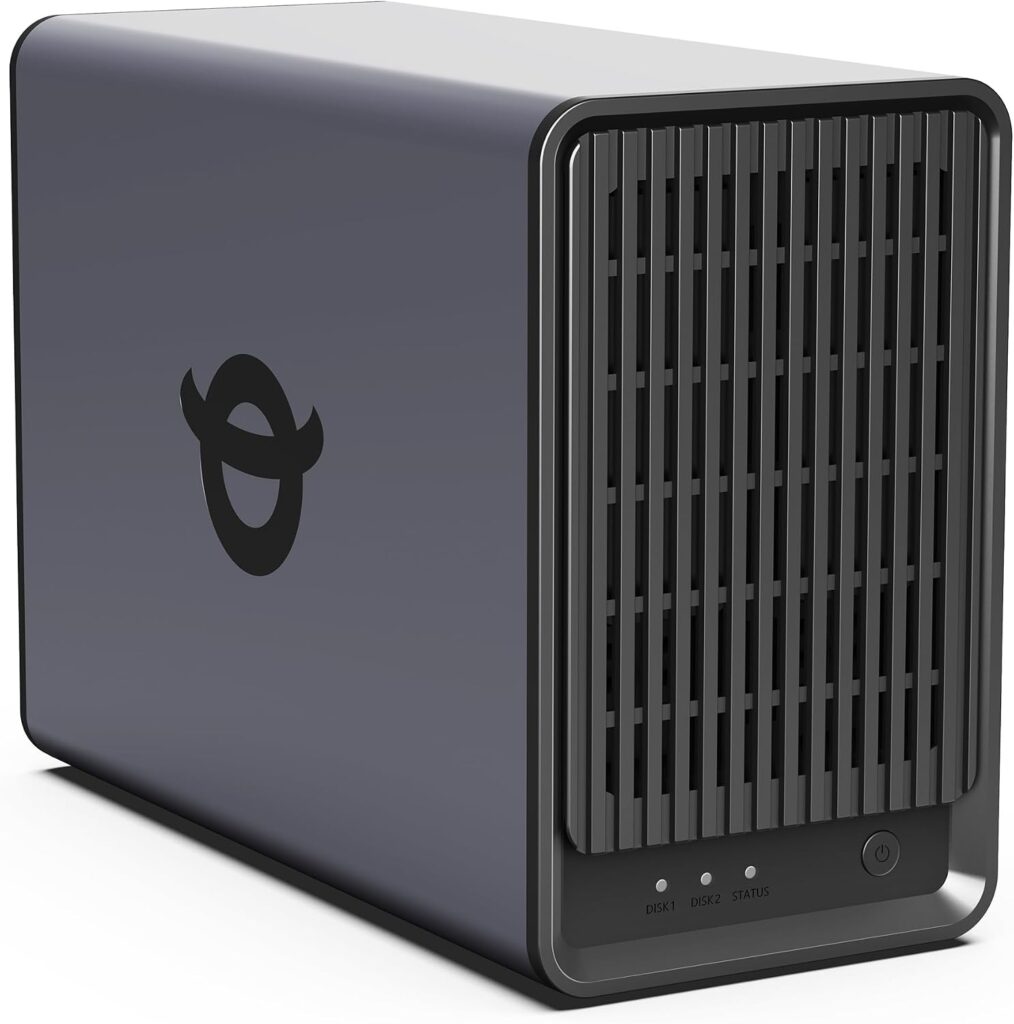
Physically, there really was not much to complain about.
The units arrived quickly, were packaged well, and drive installation was straightforward. Nothing about the hardware felt particularly cheap or poorly thought out considering the price.
Installing the disks, powering everything on, and connecting them to the network went exactly as expected.
Then I started configuring them.
That is where things became considerably less enjoyable.
Why Does a NAS Require a Cloud Account?
The first major problem with the Zero 1 is something that will immediately annoy a lot of homelab users.
You cannot simply connect the NAS to your network, browse to its IP address, create a local administrator account, and start configuring it.
Instead, you are required to register through YXK’s mobile application.
That account then becomes tied into the authentication used to access the NAS.
For a device whose entire purpose is to sit on your local network and store your data, this is an incredibly strange design decision.
A NAS should not require an outside service just to establish basic ownership and administrative access.
Cloud connectivity can be useful.
Remote access can be useful.
Mobile applications can absolutely be useful.
But all of those things should be optional.
If I buy a NAS, plug it into my switch, and want it to exist entirely on my LAN with no outside connectivity whatsoever, I should be able to do that.
With the Zero 1, that does not appear to be the philosophy.
The Web Interface Exists, But It Is Limited
There is a web interface, so at first glance things seem a little more promising.
Unfortunately, it does not provide the type of administration most experienced NAS users are going to expect.
There is also a Windows application, but the same problem applies. You can manage some parts of the system, but neither interface feels like a complete replacement for a traditional NAS administration panel.
Coming from platforms such as Synology, QNAP, TrueNAS, or even much older NAS appliances, the lack of control becomes noticeable very quickly.
You are essentially given enough access to use the device, but not enough access to really own the device.
That distinction matters.
User Management Is Far Too Limited
One of the biggest shortcomings is user and share management.
Traditional network storage is built around the idea that different users should be able to access different resources.
You might want:
- A private folder only you can access
- A family share available to everyone
- A read-only media share
- A backup account used by one computer
- Separate credentials for individual users
- Different permissions depending on the device or person connecting
That is basic NAS functionality.
The Zero 1 does not currently provide that kind of flexibility.
Access is largely centered around a single primary account rather than a proper multi-user permission model.
For someone who simply wants one storage location for one person, that may be acceptable.
For a family, small office, homelab, or anyone with more advanced storage requirements, it becomes a serious limitation.
No NFS Support
Another surprising omission is NFS.
If YXK wants this product to appeal to homelab users, Linux users, virtualization environments, or anyone doing more than basic Windows file sharing, NFS should really be part of the package.
SMB is perfectly fine for many situations, but NFS remains extremely useful for Linux systems, hypervisors, media servers, containers, and numerous other workloads.
Its absence further reinforces the feeling that the Zero 1 hardware is capable of more than the software currently allows.
The Mobile App Needs Work
Because the mobile application is such an important part of the setup process, it needs to be extremely reliable.
At the moment, mine is not.
The application repeatedly tells me that a software update is available.
When I tap the notification, it takes me directly to the Google Play Store page for the YXK application.
The problem?
The app is already installed and up to date.
In fact, I am being sent to the Play Store by the exact application that is telling me it needs an update.
There does not appear to be another version available, yet the notification continues to return.
On its own, that is mostly an annoying software bug.
The bigger issue is that YXK has made the application a required part of the experience.
If you are going to make users depend on an app to configure their storage appliance, the app cannot feel like an optional companion application that is still working through basic bugs.
The Hardware Is Actually Pretty Good
Here is the frustrating part.
I actually like the hardware.
The Zero 1 includes 2.5Gb Ethernet, which is excellent to see on something this inexpensive.
On a properly equipped network, transfer performance can be very good, and having 2.5GbE immediately makes the device much more interesting than the countless low-cost storage boxes still limited to gigabit Ethernet.
The chassis is compact.
Drive installation is easy.
Nothing about the basic hardware has made me regret purchasing it.
Considering the price, I was expecting the hardware to be the compromise.
Instead, the hardware may actually be the reason I am so critical of the software.
There is a good product hiding in here.
YXK, Please Give Users Control of Their Own NAS
If anyone from YXK happens to come across this review, this is the part I hope gets some attention.
You absolutely need to fix the local-control problem.
Forcing the user base into an app-controlled ecosystem could ultimately be the death of an otherwise excellent budget NAS.
You have already built the difficult part.
The hardware is solid.
The price is attractive.
The inclusion of 2.5Gb Ethernet is a great decision.
Now give users control over it.
A customer should be able to take the Zero 1 out of the box, connect it to their LAN, browse directly to its local IP address, and configure the entire appliance without ever creating an external account.
That means being able to:
- Create a local administrator account
- Configure the NAS entirely over the LAN
- Create multiple local users
- Create shares with individual permissions
- Use NFS
- Manage network services
- Disable cloud connectivity entirely
- Use remote access only if they intentionally enable it
- Obtain appropriate advanced or root-level administrative access
None of this means YXK needs to remove its mobile app.
Keep the app.
Keep cloud access.
Keep remote management.
Those can all be valuable features.
Just stop making them mandatory.
Homelab Users Usually Want Local-First Hardware
The Zero 1 seems almost perfectly positioned for homelab users.
It is inexpensive.
It has 2.5Gb networking.
It accepts standard drives.
It is small enough to put almost anywhere.
That is exactly the type of product someone might buy for backups, media storage, Proxmox, virtualization, Docker workloads, secondary NAS duties, off-site replication, or just experimenting with network storage.
Those users also happen to be some of the least likely people to want mandatory cloud control.
A large percentage of homelab users want the exact opposite.
They want devices that continue functioning if the internet connection goes down.
They want services that do not depend on an outside company’s servers.
They want to decide whether their equipment communicates with the cloud.
Most importantly, they want to know that a piece of hardware they purchased will continue working years from now even if the manufacturer changes direction, discontinues an application, shuts down a service, or simply stops supporting that particular model.
Local-first administration solves all of those problems.
Cloud functionality can then be layered on top for people who want it.
The Long-Term Problem With Mandatory Cloud Control
There is another issue manufacturers often overlook when building app-dependent hardware: longevity.
A hard drive can be replaced.
A fan can be replaced.
A network cable can be replaced.
But if an appliance requires authentication against an external service that disappears five years from now, perfectly functional hardware can suddenly become considerably less useful.
That should never happen with something as fundamental as a NAS.
Network storage is infrastructure.
Infrastructure should continue working independently of a manufacturer’s cloud platform whenever technically possible.
That does not mean every feature must work offline.
It does mean the core functions absolutely should.
Storage, authentication, local file sharing, user management, and administration should never depend on someone else’s server.
Who Should Buy the YXK Zero 1?
Despite everything above, I do not think the Zero 1 is a bad purchase.
For around $89 diskless, there is a lot of value here.
If you are a single user who needs inexpensive network storage, primarily uses SMB, does not need complex permissions, and does not mind registering through the manufacturer’s application, it may work perfectly well.
The 2.5Gb interface alone makes it an interesting option in the budget category.
Where I would hesitate is recommending it to anyone who expects a traditional NAS experience.
If you need advanced user management, NFS, granular permissions, LAN-only administration, or deeper control over the operating system, you need to understand those limitations before purchasing.
Final Verdict
The YXK Zero 1 is one of those products that is simultaneously easier and harder to recommend than I expected.
The hardware punches well above its price.
The networking is good.
Installation is easy.
Performance is respectable.
And for what I paid, I do not regret buying mine.
But the software philosophy needs work.
A NAS should belong to the person who bought it, not to the application required to configure it.
Give users LAN-only administration.
Give us proper local accounts.
Give us real share permissions.
Give us NFS.
Give advanced users greater control.
Then make the cloud features optional for the people who actually want them.
If YXK makes those changes, the Zero 1 could become one of the more compelling inexpensive NAS options for home users and homelab environments.
Right now, it is a surprisingly solid piece of hardware trapped inside a software ecosystem that does not give the owner nearly enough control.
And that is a shame, because the Zero 1 has the potential to be much better than it currently is.