
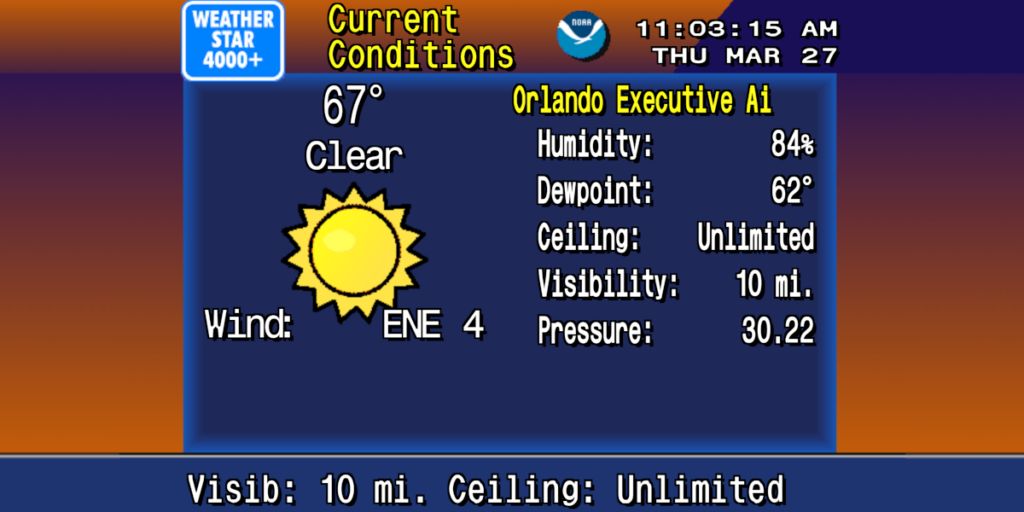
If you remember The Weather Channel in the 90s — dark blue screens, smooth jazz, chunky fonts, and “Local on the 8s” rolling by while you got ready for school — you know exactly why this project lives at Gigabyte Grove.
We’re running WeatherStar 4000+, an open-source, browser-based recreation of that classic Weather Channel local forecast, packaged in Docker so you can spin up your own “mini weather channel” anywhere you’ve got a container host.
What Is WeatherStar 4000+?
WeatherStar 4000+ is a fan-built simulation of the old WeatherStar 4000
hardware units cable companies used to insert local forecasts into The Weather Channel’s feed.
Instead of a rack-mounted box in a headend somewhere, this version runs as a modern web app that:
- Uses NOAA’s weather.gov API for real-time U.S. weather data
- Recreates the classic 90s Weather Channel look and flow
- Shows current conditions, hourly and extended forecast, radar, and more
- Runs entirely in your browser — TVs, kiosks, desktops, tablets, you name it
The main project is U.S.-only because it ties into NOAA’s API, but there is also an international fork that swaps in Open-Meteo so you can run a similar experience
outside the U.S.
How We’re Using It at Gigabyte Grove
We have two WeatherStar 4000+ feeds running here at the Grove, both in Docker:
- Gigabyte Grove / South Central Georgia feed – tuned to our local-ish area around the property
- Syracuse, NY feed – tuned to our hometown in Central New York
It gives us a really nice at-a-glance look at what’s happening here and what’s going on
back home — temperatures, radar, and near-term trends on both sides. It’s surprisingly useful
when you’ve got family and history in another region, and it keeps that nostalgic “checking the weather before work”
energy alive.
We run them on separate ports and drop them onto internal dashboards and displays around the property, so at any time
we can flip over to “Our Weather Channel” and see both worlds shaping up.
Watch Our Live Feeds
Replace these placeholders with the actual URLs or embeds when you publish:
- Gigabyte Grove / South Georgia WeatherStar 4000+ Feed:
https://video.gigabytegrove.net/playersite_5564f48a-7f74-4ffa-9922-6d8766ea72b9.html - Syracuse, NY WeatherStar 4000+ Feed:
https://video.gigabytegrove.net/playersite_22c99d6c-bf84-47d5-85a4-5f48008dbcf4.html
How to Run WeatherStar 4000+ Yourself (Docker Tutorial)
If you want your own 90s-style Weather Channel clone, here’s how to get it running with Docker using the
official container from the main project.
1. Requirements
You’ll need:
- A machine that can run Docker (Linux, Windows, macOS, or a homelab box)
- Docker installed and working
- An internet connection (for weather data and container pulls)
- A web browser on anything on your network
The commands below assume you’re running everything on the same machine as your browser or at least on the same LAN.
2. Quick One-Line Demo
If you just want to see it in action quickly, this will get you a local WeatherStar 4000+ pointed at a general
Valdosta, GA area forecast:
docker run -d \
  --name ws4kp-demo \
  -p 8080:8080 \
  -e WSQS_latLonQuery="Valdosta, GA, USA" \
  ghcr.io/netbymatt/ws4kp
Then open:
http://localhost:8080
in your browser. You’ll get the full WeatherStar 4000+ interface, with your chosen location baked in via theWSQS_latLonQuery environment variable.
3. Running Two Feeds with Docker Compose (Like We Do)
Here’s a ready-to-go docker-compose.yml that spins up two WeatherStar 4000+ instances
— one for South Georgia and one for Syracuse, NY — on different ports.
Save this as docker-compose.yml and run docker compose up -d in that directory:
services:
  ws4kp-ga:
    image: ghcr.io/netbymatt/ws4kp
    container_name: ws4kp-ga
    environment:
      # Default query for the Gigabyte Grove / South GA area
      - WSQS_latLonQuery=Valdosta, GA, USA

      # Turn on key displays by default
      - WSQS_current_weather_checkbox=true
      - WSQS_latest_observations_checkbox=true
      - WSQS_hourly_graph_checkbox=true
      - WSQS_regional_forecast_checkbox=true
      - WSQS_local_forecast_checkbox=true
      - WSQS_extended_forecast_checkbox=true
      - WSQS_radar_checkbox=true

      # Units and behavior
      - WSQS_settings_units_select=us
      - WSQS_settings_speed_select=1.00
      - WSQS_settings_kiosk_checkbox=false
    ports:
      - "8081:8080"
    restart: unless-stopped

  ws4kp-syracuse:
    image: ghcr.io/netbymatt/ws4kp
    container_name: ws4kp-syracuse
    environment:
      # Default query for Syracuse, NY
      - WSQS_latLonQuery=Syracuse, NY, USA

      # Similar default display set
      - WSQS_current_weather_checkbox=true
      - WSQS_latest_observations_checkbox=true
      - WSQS_hourly_graph_checkbox=true
      - WSQS_regional_forecast_checkbox=true
      - WSQS_local_forecast_checkbox=true
      - WSQS_extended_forecast_checkbox=true
      - WSQS_radar_checkbox=true

      - WSQS_settings_units_select=us
      - WSQS_settings_speed_select=1.00
      - WSQS_settings_kiosk_checkbox=false
    ports:
      - "8082:8080"
    restart: unless-stopped
Once those containers are running, you can access them at:
- South Georgia feed:
http://localhost:8081 - Syracuse, NY feed:
http://localhost:8082
On your network, replace localhost with the IP or hostname of the Docker host
(for example, http://192.168.1.50:8081).
4. How the Environment Variables Work
WeatherStar 4000+ uses a concept of permalinks — URLs that include every checkbox, location, and setting as
query-string parameters. The Docker image lets you map those settings to environment variables by prefixing them withWSQS_ and turning dashes into underscores.
For example:
- Permalink parameter:
current-weather-checkbox=true
Environment variable:WSQS_current_weather_checkbox=true - Permalink parameter:
settings-units-select=us
Environment variable:WSQS_settings_units_select=us
That’s what you’re seeing in the docker-compose.yml above: the layout and options are
predefined so every browser that hits the root URL gets the same “channel” experience without needing to
click through the UI.
5. Static vs. Server Deployment (Optional)
The default Docker image (ghcr.io/netbymatt/ws4kp) is a static deployment, served via
nginx, where everything happens in the browser and each client talks directly to NOAA’s API.
For most homelab or single-LAN setups, that’s perfect.
If you want more advanced behavior (especially with a lot of clients), the project also supports a
server mode with a Node.js backend that does caching, request deduplication, and logging. That uses
a different Dockerfile (Dockerfile.server) and is launched by building your own image:
git clone https://github.com/netbymatt/ws4kp.git
cd ws4kp
docker build -f Dockerfile.server -t ws4kp-server .
docker run -d -p 8080:8080 ws4kp-server
You can combine that with the same WSQS_ environment variables shown earlier.
6. Accessing It Like a Real Channel
Once you’ve got everything running, here are some nice touches you can add:
- Smart TV / Streaming box: Add a browser shortcut or kiosk-mode web app
pointing at each feed. - Reverse proxy: Use something like Nginx Proxy Manager or Traefik to give
them cleaner URLs, for example:https://weather-ga.yourdomain.tldhttps://weather-syr.yourdomain.tld
- Kiosk mode: Use the project’s kiosk/permalink options (or
WSQS_settings_kiosk_checkbox=true) for fullscreen-style displays that look like
a dedicated Weather Channel.
Links to the Project
- Main WeatherStar 4000+ project (U.S. / NOAA-based):
https://github.com/netbymatt/ws4kp - International fork (Open-Meteo-based, works outside the U.S.):
https://github.com/mwood77/ws4kp-international
At Gigabyte Grove, this setup fits right in with everything else we do: modern homelab infrastructure,
self-hosted tools, and just enough nostalgia to make it fun.
Two Docker containers, two regions, one little slice of 90s Weather Channel running right alongside
the rest of our stack.